

Industry Insights
AI Agent KPIs in Microsoft Teams: 10 Metrics That Matter in 2026
The 10 KPIs to measure a voice AI agent inside a Microsoft Teams contact center in 2026, with a focus on the CSAT split between bot, escalated, and human calls.
- ai agent kpis
- voice ai agent
- contact center metrics
Fairly often, when you ask a contact center manager which reporting tool they actually use, the answer is Excel.
They download the CSV on Monday morning, apply their macros, keep the views they’ve built over the years. It’s their data, they do what they want with it. No debate to open there. If that habit hasn’t moved in years, it’s probably because it answers a real need somewhere, and at Heedify we obviously kept the ability to download raw data as CSV or Excel for those who prefer building their own views.
The real debate is elsewhere. It’s about the KPIs you put in those files when you add a voice AI agent layer on top. Because the metrics inherited from the 100% human era translate poorly, and the new AI-specific metrics don’t have a shared standard yet.
This article walks through the 10 KPIs we consider today as the most relevant to measure a voice AI agent in a Microsoft Teams context, with a special focus on the one almost no one measures properly, and that proves, or not, that your hybrid architecture actually works.
Where we really stand on AI agent KPIs in 2026
The topic is hot. Around a dozen substantial articles are circulating, each proposing its own list : 5 KPIs, 12 KPIs, 17 KPIs, 32 KPIs. Every voice AI platform ranks its own set, generally biased toward what the platform can measure.
The truth is that we’re all still iterating. The industry hasn’t converged. The 2024 benchmarks are already obsolete, the 2026 ones will probably stabilize by late 2027. There’s no absolute truth, just teams iterating with the tools they have.
What has changed this year is that managers no longer ask “does the AI work ?”. They ask “how much does it cost, how much does it bring in, and does the customer have a better experience with it than with humans alone ?”. It’s a three-dimensional question, operational, economic and experiential. No single KPI answers that.
A quick note on perceived latency before diving into the list. Everyone talks about it, everyone targets under 800 ms for a natural feel. It’s become a commodity. If your AI agent is still above that, you have an infrastructure problem, not a measurement problem. We don’t count it in the 10 KPIs below.
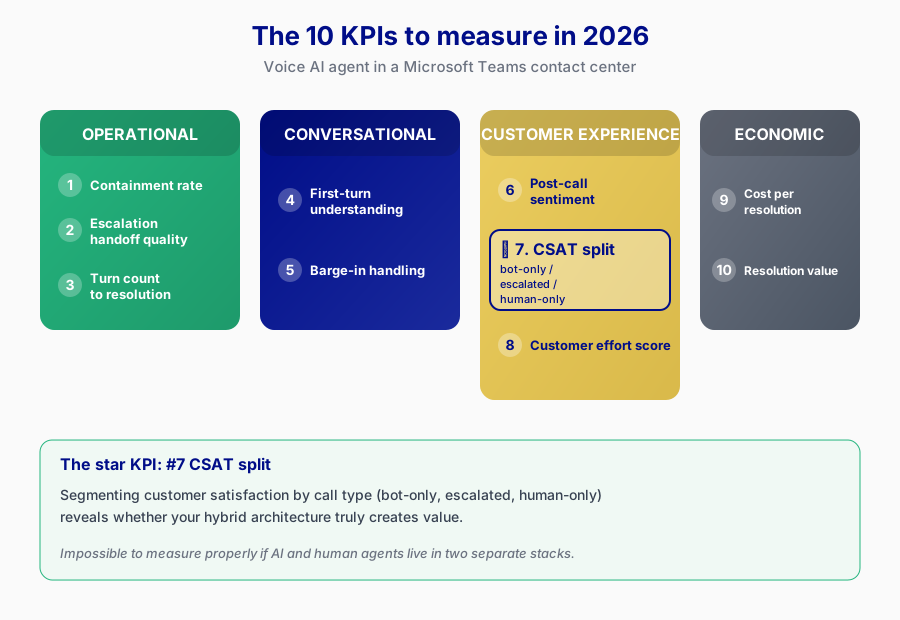
The 10 KPIs to measure today
Structured across 4 blocks : operational, conversational, customer experience, economic.
Operational block
1. Containment rate
The percentage of calls your AI agent resolves fully, without ever escalating to a human. It’s the most cited KPI in 2026, and probably the most misused.
Circulating benchmarks (see Balto and Nextiva studies) : 20 to 40% for an early stage deployment (first 3 months), 40 to 70% for a mature deployment (12 months and up). Above 70%, either it’s very mature, or the measurement is wrong (the AI “ends” a call where the customer hung up frustrated, that’s not containment, that’s abandonment).
Classic trap : optimizing containment blindly. If you force your AI to refuse escalations, your containment goes up but your CSAT drops. This KPI is never read alone, always crossed with customer satisfaction.
2. Escalation-to-human handoff quality
When the AI agent transfers to a human, does the context follow ? Does the human agent receive a conversation summary, the identified intent, the data already collected, the customer’s emotional state ?
This KPI is still poorly defined in the industry. Some measure it by asking the human agent post-call (“did you receive enough context to take over efficiently ?”), others use automated rules (number of context fields transmitted divided by expected).
It’s the KPI that separates a good AI from a “hot potato” AI that just dumps the call on a human with no explanation. Customers hate that, they have to re-explain everything. This is where technical architecture matters more than the language model.
3. Turn count to resolution
How many exchanges between the AI and the customer to reach resolution ? Lower is better. A good voice AI agent resolves a simple request in 3 to 5 turns. Above 8, there’s likely friction somewhere (poor understanding, inability to act, loop).
This KPI is a finer indicator of conversational quality than the containment rate. Two contained calls can have completely different experiences depending on whether it took 3 or 12 turns to get there.
Conversational block
4. First-turn understanding rate
Did the AI understand the customer’s intent from their very first sentence ? This is a great proxy for the quality of the NLU (natural language understanding) model and the intent design. Benchmark 2026 : above 85% for a solid implementation.
Below 70%, it’s either an under-trained model, poorly defined intents, or a degraded audio channel (low-end phone, noisy environment). This KPI helps diagnose exactly where the problem sits.
5. Barge-in handling
How many times per 100 calls does the AI mishandle a barge-in (the customer speaks while the AI is talking, the AI must stop to listen) ? It’s the classic VAD (Voice Activity Detection) and AEC (Acoustic Echo Cancellation) problem every voice AI builder hits sooner or later.
A good system handles barge-in in 95%+ of cases. A bad system creates absurd dialogues where the AI keeps talking while the customer tries to speak, or worse, mistakes its own voice for a new customer question.
This KPI is invisible in most dashboards. You have to dig into the logs, often re-listen to calls to measure it properly. It’s one of the best indicators of a voice AI platform’s technical maturity.
Customer experience block (the heart of the matter)
6. Post-call sentiment score
Sentiment analysis on the customer’s voice throughout the call : does it start neutral and end satisfied, or start neutral and end angry ? Richer than the classic post-call CSAT survey, because it captures the 95% of customers who never answer surveys.
Watch for bias : sentiment analysis in French or English is mature, but some languages (Arabic, Hindi, European Portuguese) still give less reliable results. Always cross-check with human sampling to calibrate.
7. CSAT split : bot-only, escalated, human-only ⭐
This is the KPI that would make all the difference in a voice AI platform purchase decision, and almost no one measures it properly.
It consists of segmenting your CSATs into three categories by call type :
- Bot-only : calls handled entirely by the AI, never escalated
- Escalated : calls started by the AI, transferred to a human mid-conversation
- Human-only : calls routed directly to a human without touching the AI
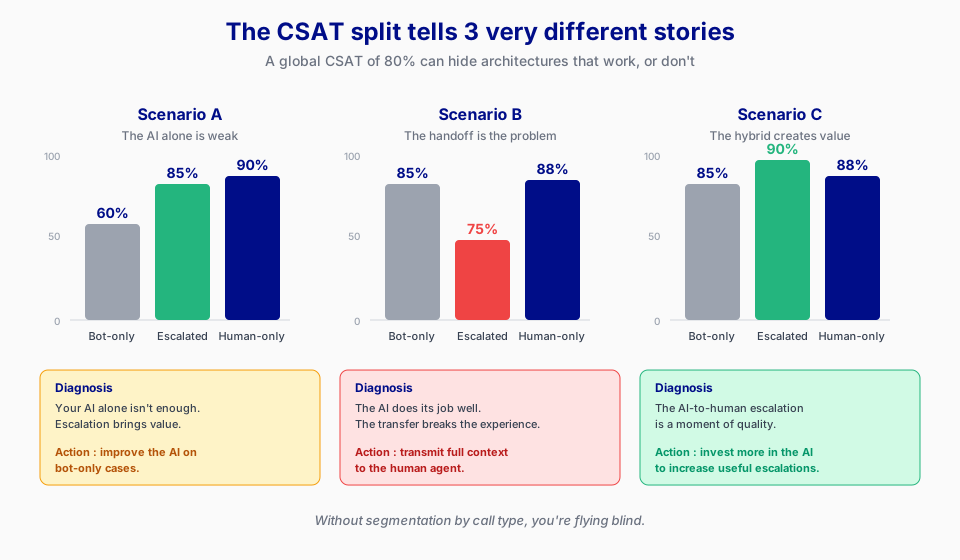
A global CSAT of 80% tells you nothing. It can hide :
Scenario A : bot-only at 60%, human-only at 90%, escalated at 85%. Conclusion : your AI alone isn’t enough, but when it escalates it adds value. Action : improve the AI on bot-only cases or revisit its containment policy.
Scenario B : bot-only at 85%, escalated at 75%, human-only at 88%. Conclusion : your problem is in the handoff, not in the AI. The AI does its job, but when it transfers, the customer feels a break. Action : improve the context transfer to the human agent.
Scenario C : bot-only at 85%, escalated at 90%, human-only at 88%. Conclusion : your hybrid truly adds value. Escalation is a quality moment, not a friction one. Action : invest more in the AI to increase useful escalations.
Without this split, you make blind decisions on your voice AI strategy.
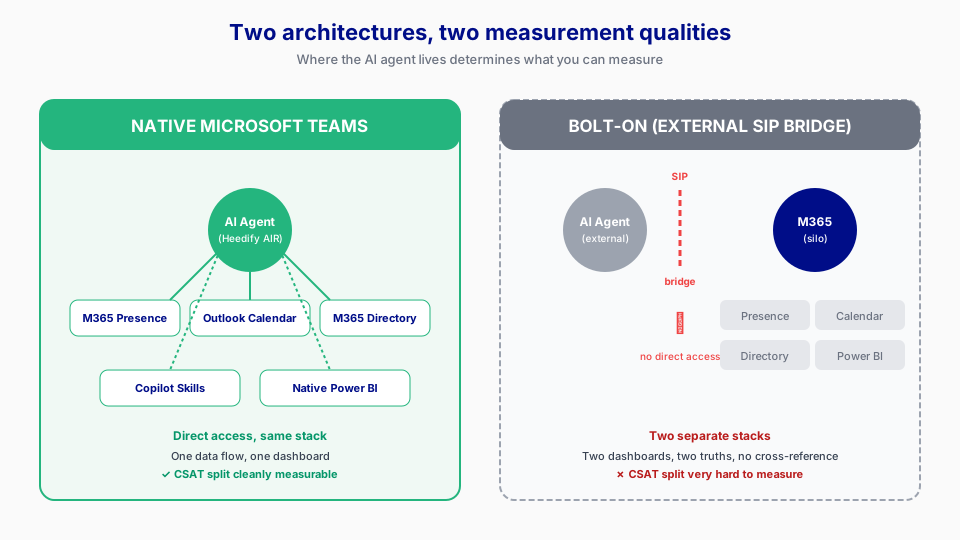
The real obstacle to measuring this KPI isn’t the conceptual difficulty. It’s that most voice AI platforms live in a stack separate from the human contact center. The AI has its dashboard, the human agents have theirs, CSATs are collected in two different systems that don’t talk to each other. Result, clean segmentation is impossible.
When your AI agent lives natively in the same stack as your human agents (which is the case in native Microsoft Teams, where the AI is a Teams participant just like a human), you can collect these three CSATs on the same channel, with the same rules, and split them properly. It’s one of the real architectural advantages of a Teams-native platform over a voice AI platform bridged via external SIP.
Keep in mind
If your bot-only and escalated CSATs are too close, your escalation adds nothing and you’re paying twice. If escalated is well above the other two, you prove the value of the hybrid and you can justify continued investment in the AI.
8. Customer effort score
How much energy did the customer have to spend to get served ? A customer who gets their answer in 2 minutes without repeating themselves or navigating a voice menu, that’s a low effort score. A customer who has to spell their name three times, gets interrupted, has to rephrase their question, that’s a high effort score.
It’s one of the best predictors of long-term customer loyalty. The lower the effort, the more the customer will come back.
Concretely, it’s computed by weighting several signals detectable automatically on the call :
| Signal | How you measure it | Suggested weight |
|---|---|---|
| Number of customer rephrasings | Detected by semantic similarity between two consecutive turns | 25% |
| AI requests for additional explanation | Analyzed by an AI identifying phrases like “can you clarify”, “I didn’t understand”, “please rephrase” | 20% |
| Long silences (>3 sec) | Log of audio timestamps, filtered by duration | 15% |
| Number of escalations requested by the customer | Detected by intent “talk to a human” | 20% |
| Mini-survey post-call response (“Was it easy ?” 1 to 5) | Automated via SMS, Teams message or WhatsApp after the call | 20% |
Simple formula : normalize each signal on a 0-100 scale (0 = zero effort, 100 = maximum effort), apply the weights, get a global score per call. An average effort score below 30 is good, between 30 and 50 is average, above 50 you need to act.
The mini-survey is the only manual signal, but with a 10 to 15% response rate on a well-run contact center, it’s enough to calibrate the automatic signals.
Economic block
9. Cost per resolution : AI vs human vs hybrid
It’s not just “AI is cheaper than humans”. It’s more nuanced :
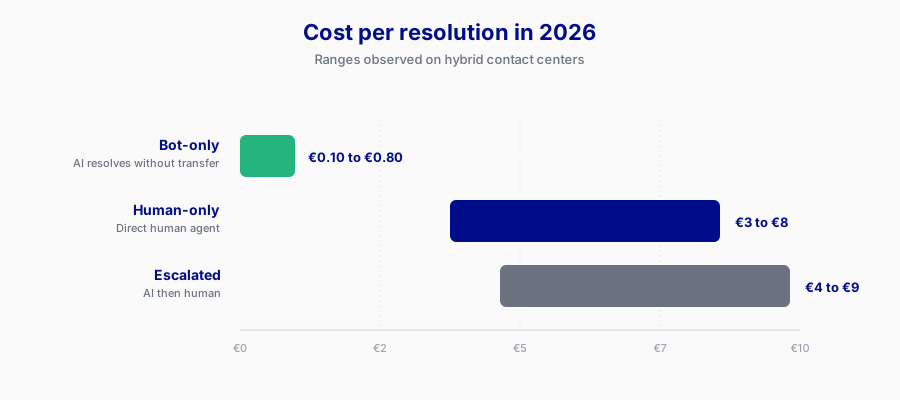
- Cost per bot-only resolution (generally the lowest, between €0.10 and €0.80 depending on volume)
- Cost per human-only resolution (generally €3 to €8 depending on geography and skill level)
- Cost per escalated resolution (the sum of both, often €4 to €9)
The real calculation is to compare the average cost per resolution in a hybrid mix (including all three types) with what the same volume would cost handled 100% by humans. That’s where you see if your AI is a profitable investment, or just a gadget that costs you CSAT without saving much.
10. Resolution value
All resolutions aren’t equal. A 45-minute customer call that saves a €50,000 account is infinitely more valuable than a 3-minute call that accelerates the loss of an €800 account.
This KPI is the reminder that speed isn’t always the goal. Some customer segments deserve long calls and generous escalations. Others can be handled very quickly by the AI with no risk. Segmentation by customer value, crossed with AI/human behavior, is where mature managers pilot their contact center in 2026.
The real game-changer : mixing human and AI in a single dashboard
This is where most tools fail, and where the conversation becomes interesting for managers.
Human agents and AI agents are two separate worlds in classic reporting. The contact center manager sees their human dashboard (connected agents, average handling time, resolution rate). The IT or digital manager sees their AI dashboard (containment rate, cost per call, sentiment). No one sees both together.
Except in a modern contact center, the two aren’t separable. A customer may start with the AI, get escalated, come back 3 days later for a follow-up with a human, be re-routed to the AI for an automatic callback. The journey is unified, the measurement must be too.
What you want in your dashboard :
- Unified queue : how many customers are waiting, regardless of whether AI or human will serve them
- Escalation flow visualized : where customers transit, when, with what satisfaction
- Cost per resolution comparative : AI-only, human-only, hybrid
- SLA met by the mix, not by the separate components
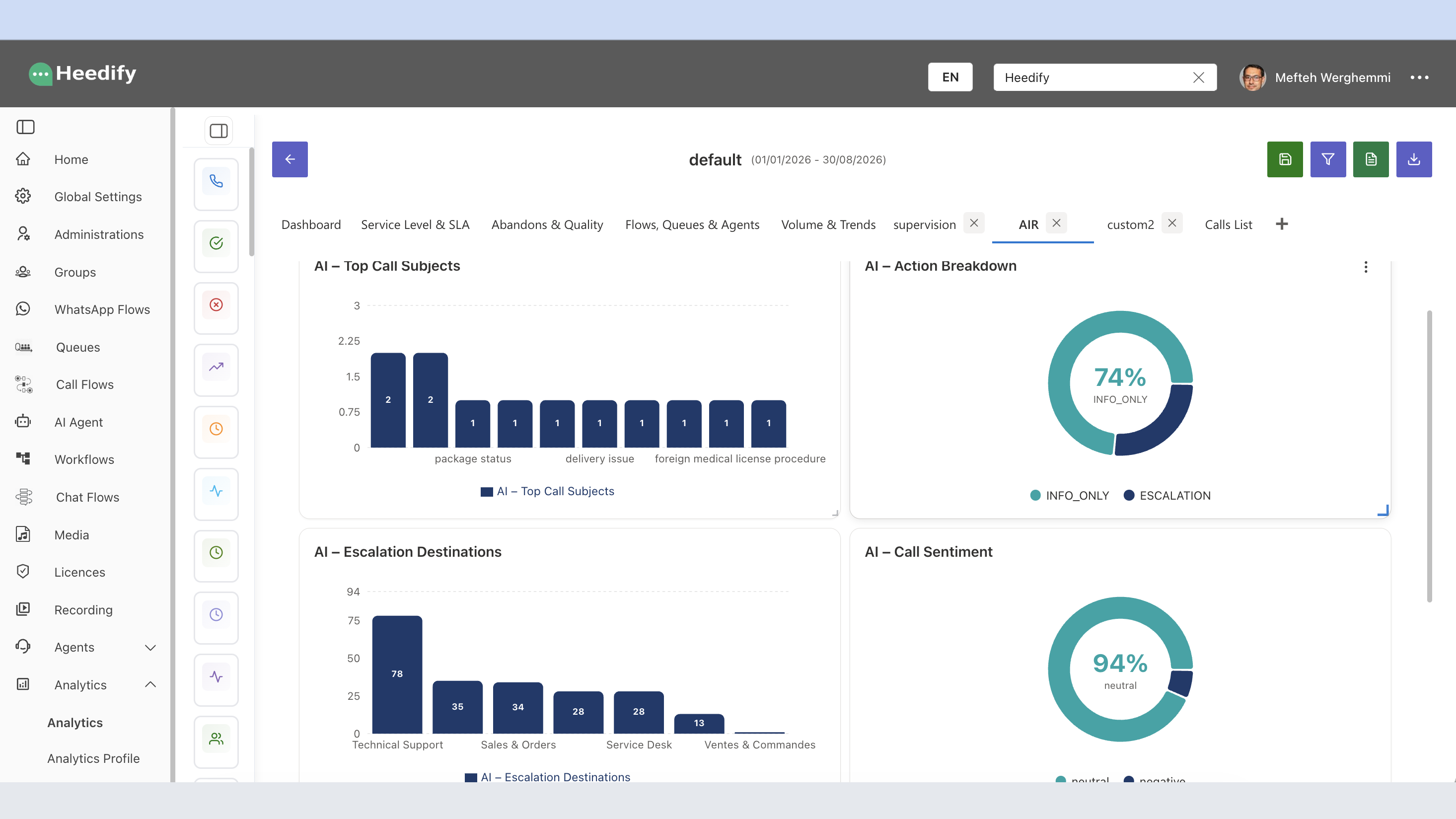
This is the kind of unified dashboard we build at Heedify with Heedify Analytics. The fact that the AI (Heedify AIR) and the human agents live in the same Microsoft Teams stack allows a single data flow, a single truth, a single dashboard. Filters, colors, cross-referenced metrics agent + queue + AI, everything is there and everything is customizable.
Why the Microsoft Teams context changes the game
Most articles about voice AI KPIs reason in abstract, as if the AI lived in one cloud and the contact center in another. That’s true for many platforms. It’s not true for native Microsoft Teams contact centers.
In a native Teams contact center, your AI agent has native access to :
- Microsoft 365 presence (the AI knows who’s available, who’s in a meeting, who’s away)
- Outlook calendar (to book appointments or check availability)
- Company directory (to transfer to the right person, not just a number)
- Copilot skills (to enrich answers with M365 data)
- Native Power BI (to report directly without exporting)
This changes the KPIs you can measure, and it especially changes measurement quality. The containment rate of an AI that has access to the calendar of escalation targets is mechanically higher than an AI that has to guess who’s available. The escalation quality of an AI that transfers with full context inside the agent’s Teams chat is mechanically higher.
This is a point few articles cover, because they reason on generic voice AI platforms. If you’re in a Microsoft Teams environment, you should ask your voice AI vendor how they exploit that integration, not just which LLM models they use.
We’re in an iteration phase, no one has the truth
Let’s say it plainly : no one has the magic formula. Benchmarks change every six months. The KPIs we consider central today might be secondary in 18 months, replaced by others we haven’t identified yet.
What matters at this stage is choosing a platform that lets you iterate. A platform where you can add a custom KPI without changing tools, where you can redefine a threshold without pausing operations, where you can cross two metrics without depending on a data team.
The manager piloting a hybrid contact center in 2026 doesn’t need a perfect dashboard. They need a dashboard they can modify fast when reality changes.
How Heedify approaches this
At Heedify we built Heedify Analytics with this philosophy : 100% customizable, inside Teams, with native access to M365 data. Each manager configures their filters, their colors, their cross-references. The CSAT split bot-only / escalated / human-only is available by default because we consider it the most important KPI for a hybrid contact center in 2026.
If you’re defining your voice AI KPIs, or if you’re frustrated that your current platform doesn’t let you split them properly, we’re open to discussing this with you. We build this topic with our pilot customers, there’s a lot to learn together.
Summary
The 10 KPIs to measure today for a voice AI agent in a Microsoft Teams contact center :
Operational : containment rate, escalation-to-human handoff quality, turn count to resolution.
Conversational : first-turn understanding rate, barge-in handling.
Customer experience : post-call sentiment score, CSAT split bot / escalated / human-only, customer effort score.
Economic : cost per resolution AI vs human vs hybrid, resolution value.
The KPI to watch as a priority in 2026 is the CSAT split. It’s the one that actually tells you whether your hybrid works, and it’s the one almost no one measures properly because it requires a unified stack between AI and human agents.
A native Microsoft Teams contact center, with its AI agent and human agents in the same layer, allows this level of measurement. It’s one of the real architectural advantages to consider when comparing voice AI platforms in 2026.
Frequently asked questions about voice AI agent KPIs
What is the most important KPI for a voice AI agent in 2026 ?
The CSAT split by call type (bot-only, escalated, human-only) is the KPI with the biggest decision impact in 2026. It reveals whether your hybrid architecture actually creates value, or whether you’re paying for an escalation that improves nothing. Containment rate remains the most cited KPI, but it isn’t enough on its own.
What is a good containment rate for a voice AI agent ?
Between 20 and 40% for an early-stage implementation (first 3 months), between 40 and 70% for a mature deployment (12 months and up). Above 70%, check that your “resolutions” don’t hide abandonments or frustrated customers who hung up.
Do classic human KPIs (AHT, CSAT, FCR) apply to an AI agent ?
Partially. AHT (Average Handle Time) becomes almost meaningless for an AI that costs cents per call. Classic CSAT stays useful but suffers from novelty bias. FCR (First Call Resolution) needs redefinition in a hybrid context. It’s more effective to add AI-specific KPIs (containment rate, escalation quality, first-turn understanding) than to force human KPIs on the AI.
How do you measure escalation quality from AI to human ?
Two complementary approaches. Automated : count the number of context fields transmitted to the human agent (transcript, identified intent, collected data, sentiment) divided by expected. Declarative : mini-survey to the human agent post-call (“did you receive enough context to take over ?”). Cross-referencing both gives a reliable picture.
Why does the Microsoft Teams context change how KPIs are measured ?
Because the AI agent has native access to M365 data (presence, calendar, directory, Copilot, Power BI). This mechanically increases KPI quality (better escalation, better containment) and enables the CSAT split because the AI and human agents live in the same stack. A voice AI platform bridged via external SIP cannot offer this level of measurement.
How does Heedify approach voice AI KPIs ?
Heedify Analytics is a 100% customizable dashboard engine, native to Microsoft Teams. Each manager configures their filters, colors and metric cross-references. The CSAT split bot-only / escalated / human-only is available by default, along with the 10 KPIs described in this article. Cross-visualization of human agents and AI agents in one dashboard is one of the main differentiators.
Sources and references
This article draws on the substantial 2026 analyses published by :
- Balto — KPIs for Voice AI Agents in Contact Centers (17 metrics)
- Nextiva — AI Agent Performance Metrics for 2026
- Famulor — 12 Voice AI Agent KPIs That Matter in 2026
- Retell AI — 32 Call Center Metrics That Actually Predict Performance
- Rasa — 5 Contact Center KPIs You Must Track
- Ada — Top metrics for AI voice agents in customer service
- Microsoft documentation : Teams presence, Copilot