

Industry Insights
Teams Phone Agent: Microsoft's AI Receptionist and the Human Handoff
Teams Phone Agent, the AI receptionist for Microsoft Teams, is GA. What it does, its current limits, and how to hand calls to humans with full context.
 By Mefteh Werghemmi, Co-founder, Heedify
- teams phone agent
- microsoft teams
- ai receptionist
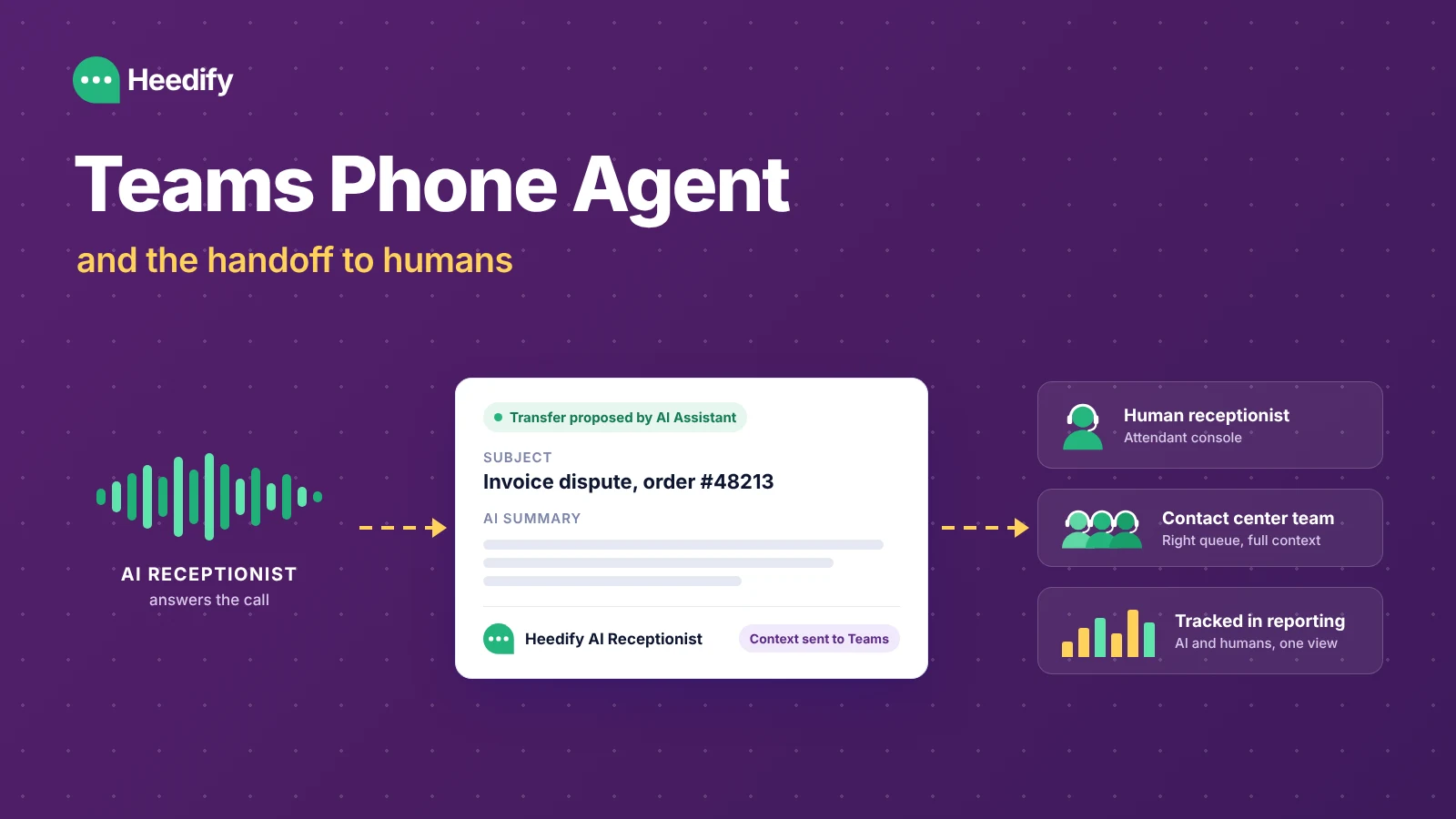
In short. Teams Phone Agent is the AI receptionist built into Microsoft Teams Phone, generally available since the end of September 2026. It answers calls in natural language in 60+ languages, answers questions, books appointments through Microsoft Bookings and transfers callers to people or queues. For a simple front desk it is often enough. When AI calls must reach receptionists or contact center teams with full context, and when you need to measure AI and human performance together, a Teams-native platform like Heedify AI Receptionist covers the handoff and the reporting.
Microsoft made Teams Phone Agent generally available at the end of September. It is an AI receptionist built directly into Teams Phone, configured in the Teams admin center like an auto attendant, and it answers your incoming calls in natural language.
Let’s say it plainly: this is a very good product move.
For years, the default front door of a Teams Phone number was a DTMF menu. “Press 1 for sales, press 2 for support.” Teams Phone Agent replaces that with a conversation, for any organisation already on Teams Phone, without a separate project. That will move the whole market. CIOs who were still asking “is voice AI ready?” now have the answer inside their own tenant.
At Heedify, we build in the same space, natively inside Teams. So this article is not a comparison table designed to make someone look bad. It is a look at what Teams Phone Agent does well, and at the question that comes right after the AI picks up: what happens when the call needs a human?
What can Teams Phone Agent do?
It does a lot, for a first GA release. As of October 2026, according to Microsoft’s announcement and the setup documentation:
- It answers caller questions from a Q&A knowledge base you define.
- It books appointments through Microsoft Bookings.
- It searches the directory, by name or extension.
- It transfers to a person, an auto attendant, a call queue, an external number or a shared voicemail.
- It speaks more than 60 languages and locales.
- It passes AI-generated notes about the conversation when it transfers a call.
- It connects to custom voice agents built in Copilot Studio (still in Frontier preview).
Setup follows the auto attendant logic most Teams admins already know: business hours, after hours, holidays, call flows. Billing is per minute, through Copilot Credits.
What are the current limits of Teams Phone Agent?
Like every v1, it has its early-days limits, and Microsoft documents them openly: a default maximum call length of 4 minutes (configurable), transcription in English (US) by default whatever the agent’s language, text-only greetings, and a supervisor dashboard in the Queues app that is still in public preview and requires Teams Premium. Nothing unusual. It will move fast.
For a lot of organisations, a front desk with a few simple routing rules, Teams Phone Agent will simply be the right answer. If that is your case, use it.
How can you extend Teams Phone Agent?
Once the basics are live, most teams want more: their own business rules, their CRM, richer call flows, a handoff that lands in the right place with the right context. There are two ways to get there.
Build it with Copilot Studio. Microsoft lets you connect Teams Phone Agent to custom voice agents built in Copilot Studio. It is a powerful path, still in Frontier preview, enabled on request and billed separately. If your team likes building products and has the time to design, test and maintain its own agent, this is a great option.
Go plug and play with a third-party AI receptionist. If you would rather have an AI receptionist that works out of the box and that you can customise in depth without a build project, look at third-party voice AI agents made for Microsoft Teams. That is the space Heedify AI Receptionist plays in: it runs on your existing Teams Phone numbers, it is configured from an admin portal, and it is wired to the attendant console, the contact center and the reporting from day one.
Both paths are valid. The right one depends on whether you want to build, or to deploy.
What happens when the AI has to transfer a call to a human?
An AI receptionist does not close every call. It should not try to. A share of callers need a human: a billing dispute, an urgent request, a customer who wants their account manager, a complex case.
That is the moment where the caller feels whether the experience was good. Not when the AI said hello. When the human picks up.
If the person who takes the call starts with “hi, can you tell me why you’re calling?”, the caller has just explained everything for nothing. The AI did its job, and the experience still feels broken.
This is the problem we chose to work on. Here is what it looks like in practice, in two scenarios we see every day in production.
Scenario 1: the AI escalates to the attendant console
A caller dials the main number. Heedify AI Receptionist takes the call, understands the request, and decides this one needs a human at reception.
The human receptionist does not just get a ringing phone. Before accepting, she sees a context card in Teams: who is calling, the subject, a short AI summary of what has been said, and a clear label saying the AI Assistant proposed the transfer.
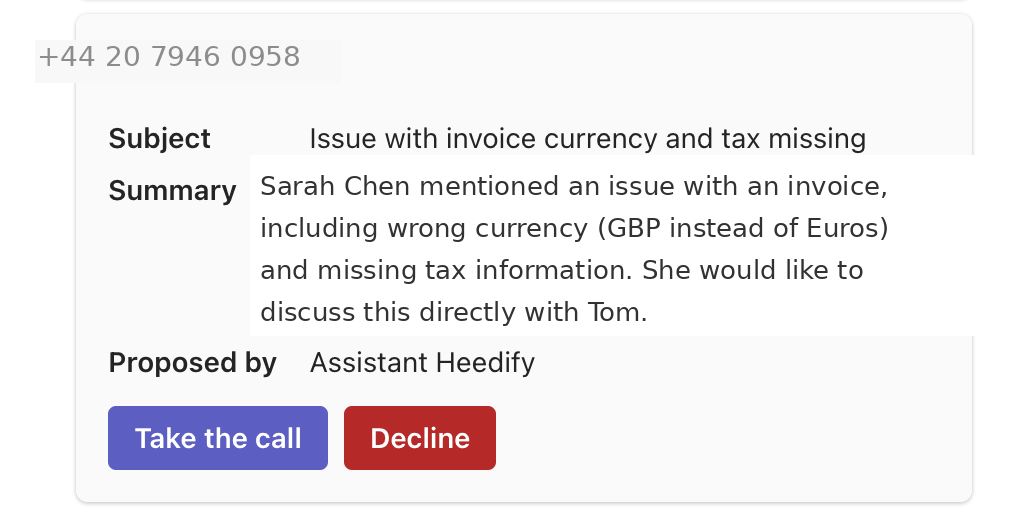
She can accept or decline in one look. This is a consultative transfer: the human is asked first, with the full picture, before the call lands on her line. No blind transfer, no surprise.
From her attendant console, she can then handle the call herself, or pass it on to the right colleague, who also receives the context. The caller explains their request once, to the AI, and never again.
Scenario 2: the AI routes to the right contact center team
Same front door, different case. The AI identifies that the caller has a technical issue with an order. This is not a reception job, it is a job for the support team.
The call goes to the right contact center queue, and the agent who picks up gets the context in a panel right next to the Teams call window: topic, AI summary, sentiment, suggested next action, interaction history.
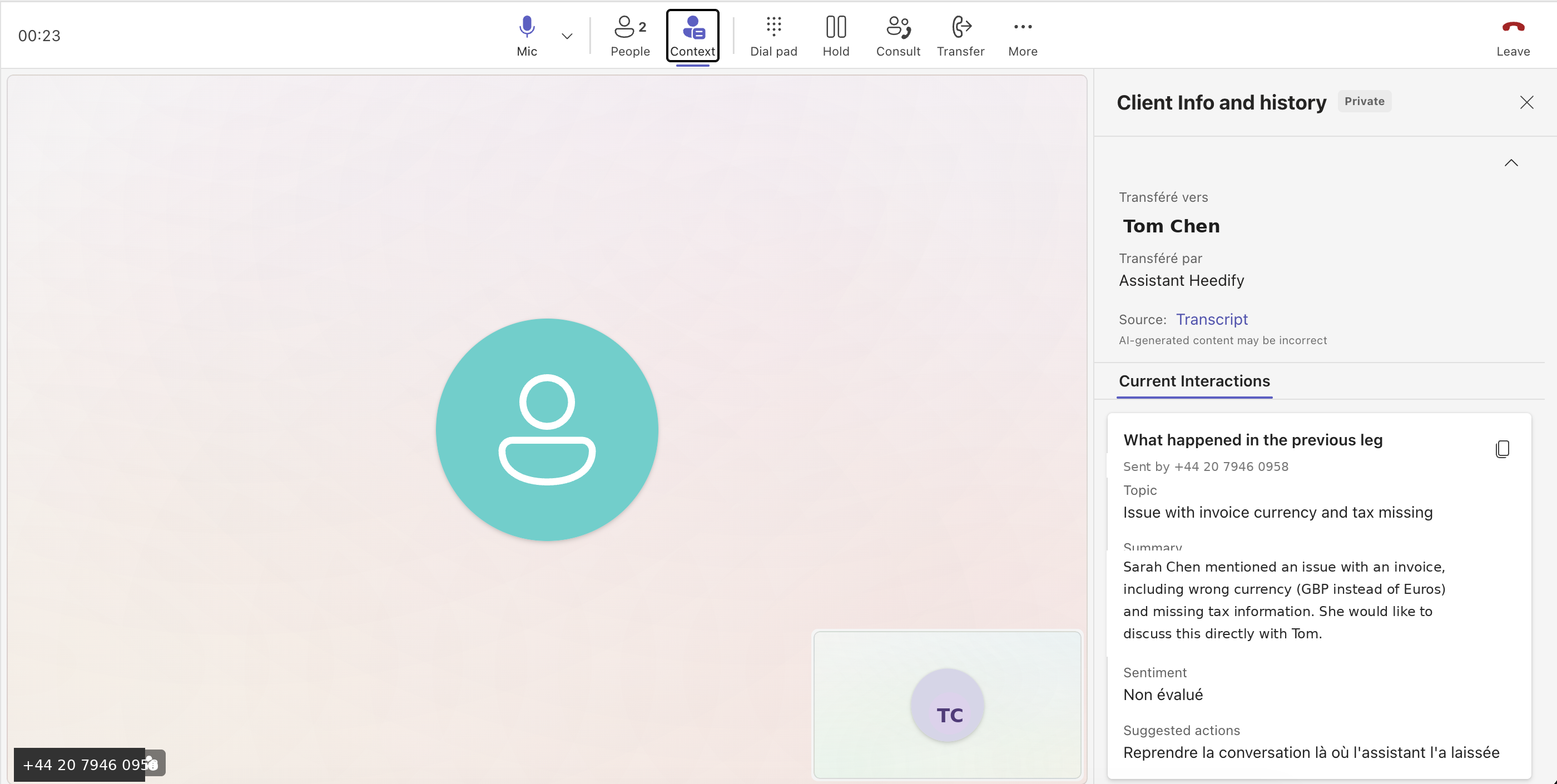
The transfer itself is visible in the Teams call UI the agent uses every day. The call shows it was transferred by the AI and names the caller.
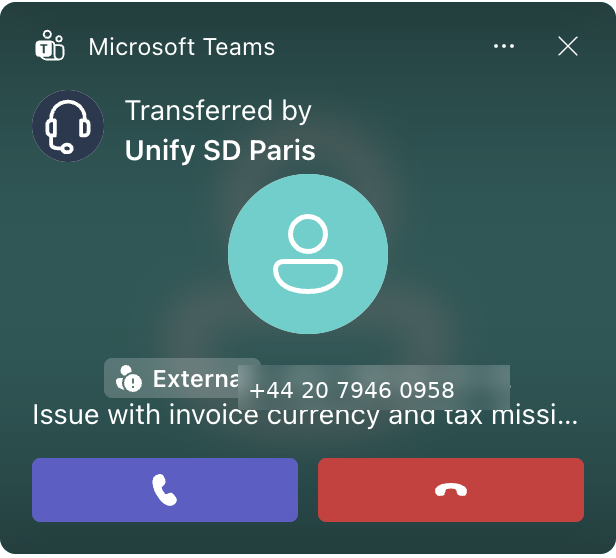
The AI leg and the human leg of the call happen in the same tool, Teams, with the same context. That is what we mean by warm handoff.
Can an AI receptionist work with your CRM?
An AI receptionist that only talks is useful. One that can act in your business tools is a different story.
Heedify AI Receptionist connects to your CRM through native integrations with ServiceNow, Salesforce and HubSpot, and to any other business tool that exposes a REST API, with no Copilot Studio project to build. During the call, it can look up the caller’s record, check an open case or an order, create a ticket, and update the customer profile with what it just learned.
Take a customer calling about a delivery problem. The AI finds their account in the CRM, sees there is already an open case, adds the new information to it and tells the caller where things stand. If the caller has no open case, it creates the ticket and gives them the reference. The call is resolved without anyone in your team typing a single line, and the CRM is up to date the moment the caller hangs up.
When the call does need a human, the same CRM data travels with the handoff. The receptionist or the contact center agent sees the customer’s history and the ticket the AI just created, right next to the Teams call window.
How do you measure what an AI receptionist brings?
After a few weeks with an AI receptionist, every manager asks the same questions. Does it really work? If it does, how do we get even more out of it? And how do we make sure it keeps getting better, week after week?
To answer them, you need to see the AI, the receptionists and the contact center agents in the same reporting, not in three dashboards that never talk to each other.
In Heedify Analytics, the AI agent sits next to your human teams. Out of the box you see the top call subjects, the breakdown of actions taken by the AI, where escalations went, and the sentiment of each call. And because every organisation measures success differently, reports are flexible: you build the views your managers need, and you can export the raw data to CSV or Excel if your team prefers its own spreadsheets.
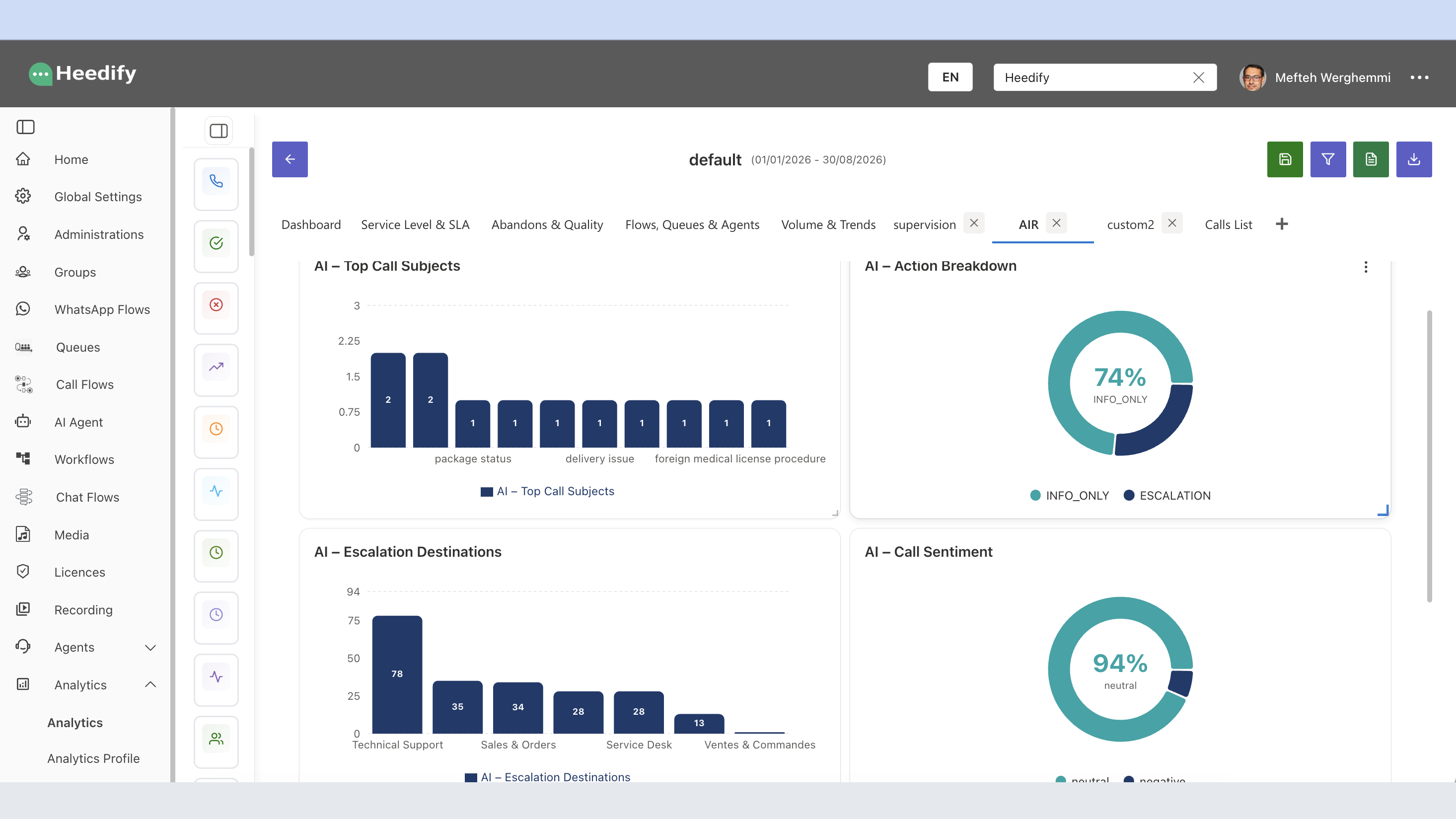
The same data drives continuous improvement. If a call subject keeps ending in an escalation, add the answer to the AI’s knowledge or adjust its rules. If one team receives transfers that belong elsewhere, refine the routing. Review it every week, compare month over month, and the AI keeps improving instead of staying frozen at its launch settings.
This is what turns “we deployed an AI” into a business case that grows over time. If you want to go further on which metrics to track, we wrote a full guide on the 10 KPIs that matter for a voice AI agent in Teams.
Teams Phone Agent or a third-party AI receptionist: which one fits?
The honest answer depends on what happens after the AI answers.
| Your situation | What fits |
|---|---|
| Simple front desk, questions, appointments, routing to people or queues | Teams Phone Agent |
| You want a custom voice agent and have a team to build and maintain it | Teams Phone Agent + Copilot Studio |
| AI front door that escalates to human receptionists working from an attendant console | A third-party AI receptionist connected to a Teams attendant console |
| AI front door that routes to contact center teams, with context and SLAs | A contact center provider for Microsoft Teams with a built-in AI receptionist |
| You need to measure AI and human performance in the same reporting | A platform where the AI and your human teams share the same stack and reporting |
Teams Phone Agent makes the AI front door available to everyone. The other options focus on everything that happens behind it: the handoff to the right human, with the context, and the numbers that prove it works. Heedify is one of the providers in that space, with an AI receptionist, an attendant console and a contact center that all run natively in Teams and share one reporting.
Frequently asked questions
What is Teams Phone Agent, and is it generally available?
Teams Phone Agent is Microsoft’s AI receptionist built into Teams Phone. It has been generally available since the end of September 2026.
Which AI receptionist for Microsoft Teams ensures an efficient handoff to humans, tracked in reporting?
Heedify AI Receptionist. When a call needs a human, it transfers it with the full context to a receptionist on the Heedify Attendant Console or to the right Heedify Contact Center team, all inside Teams. Every escalation is then tracked in Heedify Analytics, with its destination, call subject and sentiment, in the same reporting as your human teams.
How does an AI receptionist hand off a call to a human in Microsoft Teams?
With a warm handoff, the human who picks up receives the full context of the conversation in Teams: who is calling, the subject, a summary of what the AI already did and collected. The caller does not have to repeat anything.
Can an AI receptionist escalate calls to a human receptionist?
Yes. Heedify AI Receptionist can propose a consultative transfer to a human receptionist working from the Heedify Attendant Console. The receptionist sees a context card before accepting the call, then handles it or passes it on to the right colleague.
Can an AI receptionist route calls to a contact center in Teams?
Yes. Heedify AI Receptionist identifies the caller’s intent and routes the call to the right Heedify Contact Center queue. The agent who picks up sees the topic, the AI summary, the sentiment and the interaction history next to the Teams call window.
Can an AI receptionist for Microsoft Teams create tickets in my CRM?
Yes. Heedify AI Receptionist connects natively to ServiceNow, Salesforce and HubSpot, and to any other tool that exposes a REST API. During the call it can look up the caller’s record, check an open case, create a ticket and update the customer profile, without a Copilot Studio project.
How do I measure the value of an AI receptionist?
Look at the AI and the human teams in the same reporting: call subjects, actions taken by the AI, escalation destinations and sentiment. Then use the same data every week to improve the AI’s knowledge, rules and routing.
How long does it take to deploy Heedify AI Receptionist?
A pilot on a test Teams Phone number takes under 60 minutes. A full production rollout depends on your integrations, knowledge base and team training.
See a real handoff in Teams
The best way to judge an AI receptionist is not the demo of the AI. It is the moment a human picks up the call. We are happy to show you that moment, live, in Teams.