

Industry Insights
Teams Call Queue Callback: What It Does and What It Misses
Microsoft added native callback to Teams call queues in late 2024. What it does, where it breaks down in production, and what a callback must guarantee.
- microsoft teams
- call queue
- callback
Microsoft Teams has offered a native callback option in call queues since the end of 2024. It is configured in the Teams Admin Center or PowerShell, it costs nothing beyond your Teams Phone licence, and for a lot of organisations it is enough. But it has no timer of its own. It borrows the queue timeout, and the wait time it announces to your caller has no relationship to how long that caller has actually been waiting. This article covers what the feature does, where it fails once real callers are involved, and what a callback has to guarantee before it is worth making.
Why callers ask for a callback
Callers do not wait. The most credible UK benchmark puts the average call abandonment rate at 8.4% and the average speed to answer at 116 seconds, according to ContactBabel’s 2024 UK Contact Centre Decision-Makers’ Guide surveying 225 contact centres. SQM Group’s guidance places the benchmark average nearer 5%, treats anything from 5% to 10% as acceptable, and puts top-performing centres at around 3% or below.
Those two figures describe the same problem from different angles. An average speed to answer close to two minutes means a meaningful share of your callers are deciding whether to stay at exactly the moment their patience runs out.
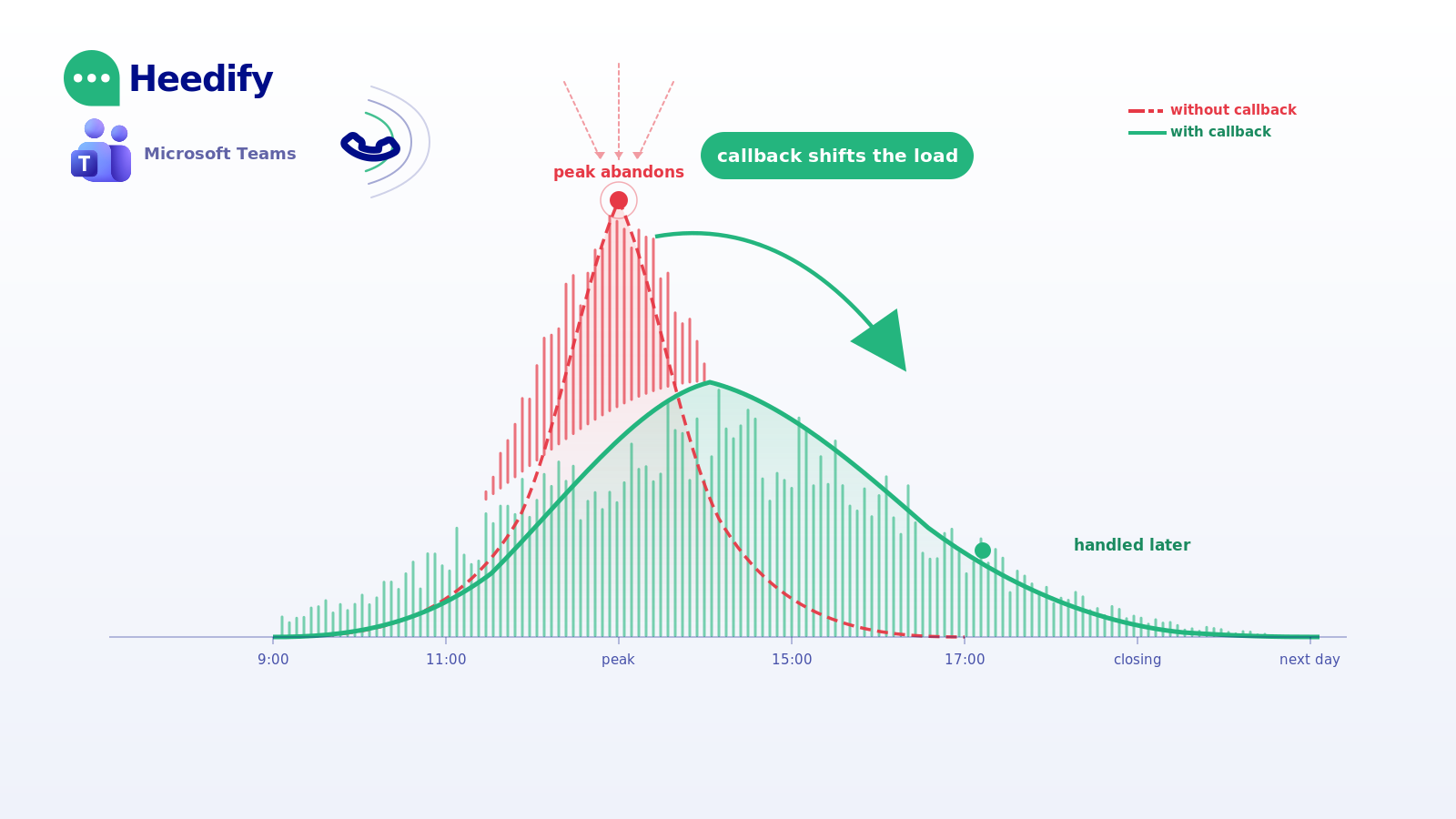
What the abandonment number hides is worse. An abandoned call is rarely a lost caller. It is a caller who will call again, usually within the hour, often twice. Your volume does not fall when people hang up. It moves, and it concentrates in your peak.
A callback does something no amount of hold music does: it takes the caller out of the queue without taking them out of the process. Done properly, the caller stops waiting, the queue stops growing, and the organisation keeps the contact. Done badly, it is worse than nothing. A caller who hangs up on a promise and never hears back has been failed twice.
What Microsoft built
Credit where it is due. Native callback in Teams call queues is a real feature, properly integrated, and included in the licence you already have.
The administrator can define three different parameters as thresholds in a call queue: wait time in the queue, the number of waiting calls, or the number of available agents. If one threshold is hit, the caller becomes eligible for a callback. The third is the most interesting: it works on the ratio between callers waiting and agents signed in, so with three agents signed in and a ratio value of one, the fourth caller entering the queue becomes eligible. That is a sensible way to express “we are underwater right now” without hard-coding a number of minutes.
A caller becomes eligible after a 60-second wait, which is the minimum, and the queue timeout value must be higher than the callback wait time.
Configuration is done in the Teams Admin Center, under Voice then Call queues, on a dedicated Callback tab. Everything the admin sets, the caller will hear.
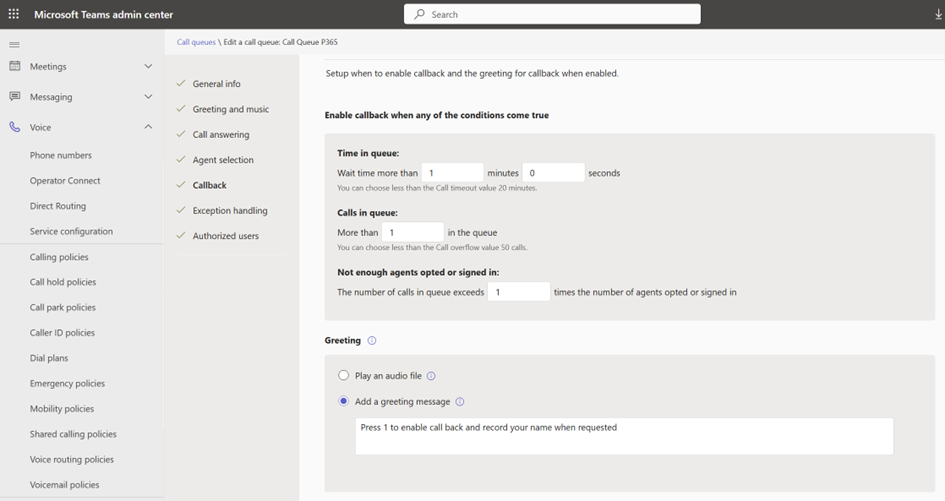
The settings that matter, in one place:
| Setting | What it does |
|---|---|
| Time in queue | Minimum wait before the callback offer plays. Minimum 60 seconds, must be lower than the Call timeout value. |
| Calls in queue | Callback becomes eligible when more than N callers are waiting. Must be lower than the Call overflow value. |
| Agents ratio | Eligible when the ratio of waiting callers to signed-in agents exceeds a value. A clean way to say “we are underwater” without hard-coding a minute count. |
| Greeting: audio file or TTS message | The offer prompt played to eligible callers, telling them which key to press. |
| DTMF key | The digit callers press to accept the offer. Any character on a classic dial pad. |
| Notification group (Microsoft 365) | Receives an email if the callback times out or cannot be completed. |
| Conference mode | Must be enabled on the queue. The callback flow will not work without it. |
Everything above is also scriptable via New-CsCallQueue and Set-CsCallQueue for teams that manage queues in bulk.
The caller hears the offer, presses the key, and then goes through a step that surprises most administrators the first time they test it. Teams plays a predefined system announcement asking the caller to record their name. It then tells them that the next available agent will call back, that the callback may take up to X minutes, and that if the callback is missed they should call the hotline again later.
On the agent side, as soon as an agent ends a call and becomes available, the Teams platform calls that agent, starts a conference when the agent picks up, informs the agent about the callback request, and then dials the caller back. The resource account of the auto attendant or call queue is used as the outbound identity.
None of this costs extra. Auto attendant and call queue come with the first Teams Phone add-on licence. If your requirements are modest, stop reading here and go and enable it.
Where Teams call queue callback breaks down
The feature works. The problems appear once you involve real callers, real queue timeouts, and a team that cannot predict when an agent will be free.
The most thorough public account of these problems comes from Thorsten Pickhan, a Microsoft MVP for Microsoft 365 who tested the feature in production conditions and documented what he found on Practical365. He is broadly positive about it, which is exactly why his criticisms carry weight.
The promise is the queue timeout, not the caller’s wait
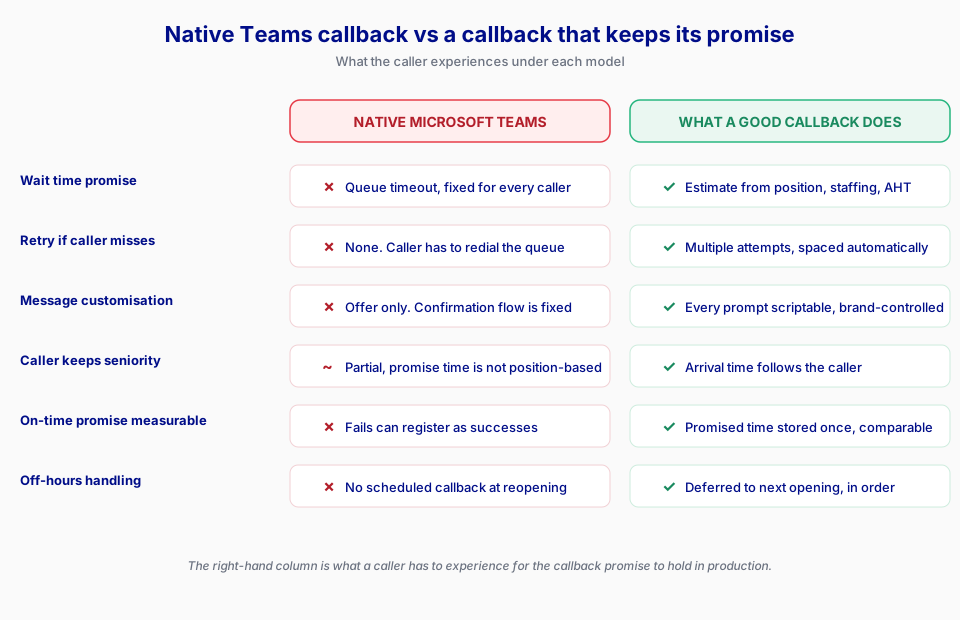
When your caller accepts a callback, Teams tells them how long it will take. That number is not calculated from their position, your staffing, or your average handling time. Asked in the comments of his article whether the message could be changed, Pickhan confirmed that the system prompt always uses the call queue timeout value defined in the queue configuration: if the timeout is set to five minutes, the prompt announces a callback within five minutes, regardless of how long the caller has already waited. A custom message option is not available today.
Two callers accept a callback, one after ninety seconds and one after eleven minutes. Both are told the same thing. The number they hear is a configuration value that exists for an entirely different purpose.
The administrator who raised the question put the operational consequence plainly. Running a small MSP team, he explained that they cannot guarantee when an agent will be free, since agents may be on a call for thirty minutes or more, and concluded that he had high hopes for the feature but that it appeared to be lacking.
There is no dedicated timer
The callback feature relies entirely on the call queue timeout value, because Microsoft did not implement a dedicated timer for it. The entire process, which includes the caller’s wait in the queue, the callback request, finding an available agent and initiating the callback, cannot exceed the call queue timeout.
Your timeout is not a callback budget. It is the value that decides what happens to an unanswered call. Now it silently governs a process that starts with someone waiting on hold and ends with an outbound call to a mobile phone.
A failed callback can be recorded as a success
In Pickhan’s testing, with a one-minute wait time and a two-minute queue timeout, the caller enabled the callback and the test agent received the callback call. But when the agent picked up, they heard only the callback message, sometimes in full and sometimes just a few words, and then the system ended the call. There was no error message and no indication of why the call ended abruptly.
Because Teams had managed to connect to an agent and start playing the callback message, the callback was treated as successful and nobody was informed about a failure. The caller was not called back. The notification group received nothing. The reporting says it worked. Raising the timeout to five minutes resolved it, but only after extensive testing and a careful re-reading of the documentation.
The offer only replays when the hold music restarts
The callback option is offered each time the music on hold ends and restarts, and the default music on hold is two minutes long. So although a caller may be eligible after one minute, with default music they will not actually be offered the option until two minutes have passed. If you have uploaded your own hold music, the offer cadence is now a property of your audio file.
No retry
There is no second attempt. The announcement informs the caller that if the callback is missed, they should call the hotline again at a later time. Callers miss callbacks constantly. A callback system without retries converts a large share of accepted promises into a caller who has waited, hung up, missed a call, and has to start over.
Caller ID restrictions
The callback feature requires that the caller’s inbound number is publicly dialable, non-premium, and in E.164 format, with some specific exclusions for North America. Callers from a switchboard without a direct line, from certain non-geographic ranges, or with number presentation withheld will not get the option.
The message cannot be customised
Beyond the offer prompt, the flow is fixed. The name-recording step is a predefined system announcement. You cannot skip it, rephrase the promise, or adapt the tone to your brand.
Worth noting: Microsoft has a better callback, and it is not in Teams
Dynamics 365 Contact Center takes a different approach. Direct callback is configured as an overflow action at queue level, triggered when the queue exceeds a defined number of waiting calls or exceeds the estimated wait time. The work item stays in the queue after the caller disconnects, and once it reaches position one a voice callback is initiated automatically. That design preserves the caller’s place properly. It has its own limits: the callback option is not customisable, direct callback is not supported with Copilot Studio agents, and the system automatically closes requests after seven days. The point for a Teams administrator is simply that Microsoft has built queue callback twice, and the more complete implementation is in a different product with a different licence.
What a callback has to guarantee to be worth anything
Strip away the products for a moment. A queue callback makes one promise to a human being: hang up, and we will call you. Four things have to be true for that promise to mean anything.
The caller keeps their place, or it is not a callback. If a caller who has waited eleven minutes is called back after someone who has waited two, you did not offer them a callback. You offered them a voicemail with better marketing. The caller’s arrival time has to follow them.
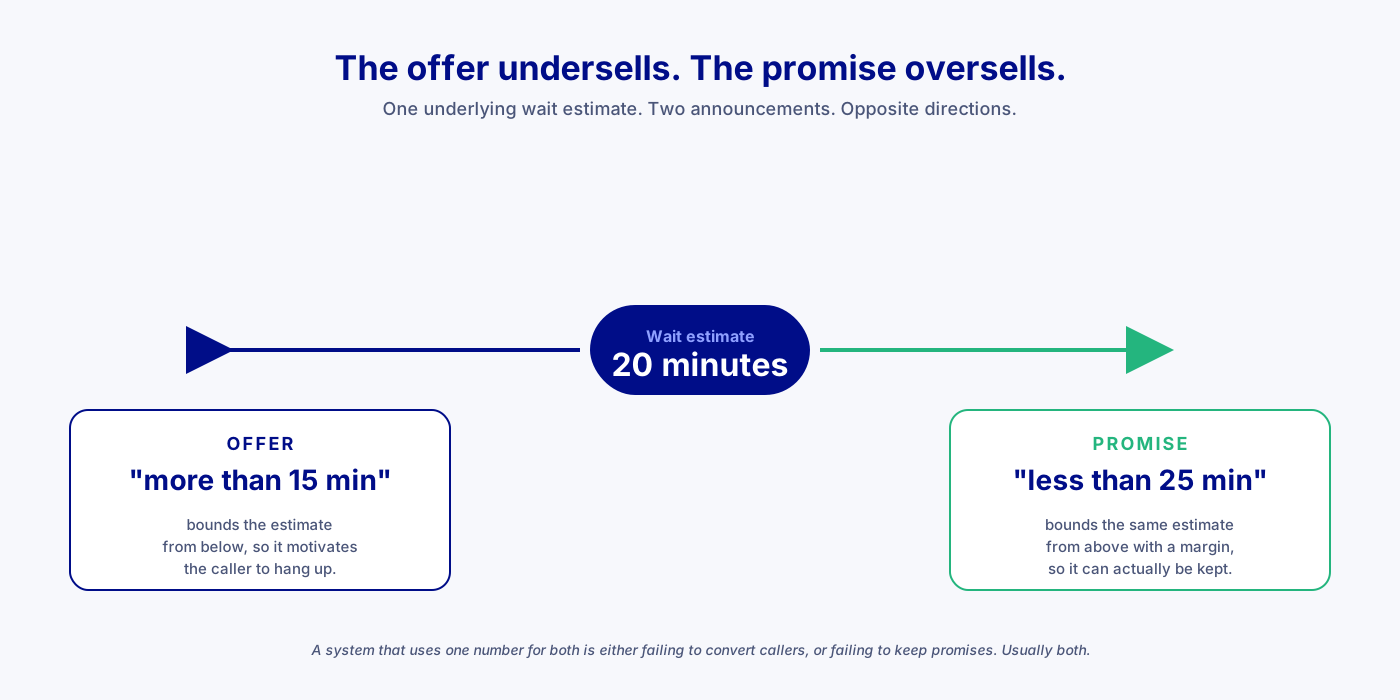
The offer should undersell, the promise should oversell. This sounds like a contradiction and it is the most useful idea here. The offer has to motivate: if you tell someone their wait is under twenty minutes, they will hold. So the offer bounds the estimate from below, more than fifteen minutes. The promise has to be kept, it is measured, and being late is a failure. So the promise bounds the same estimate from above, with a margin, less than twenty minutes. Two announcements, one underlying estimate, opposite directions. A system that uses one number for both is either failing to convert callers or failing to keep promises, and usually both.
If you cannot measure the promise, you did not make one. Ask your vendor, or your own platform, one question: what percentage of callbacks were connected before the time you promised? If the answer requires a project, the promise is decorative. The deadline announced to the caller and the deadline stored for measurement have to be the same value, written once. Two separate calculations will drift.
Say nothing rather than promise what you cannot keep. A centre closes at 18:00. A caller arrives at 17:50 with an estimated wait of forty minutes. “We will call you back within forty-five minutes” is a lie. At 18:30 there is nobody in the building. The correct behaviour is to change register entirely: not a duration but a window, as soon as we reopen, with a callback scheduled for the next opening. And when the system does not know when it reopens, because opening hours were never configured, it should say nothing at all. A promise with no date is not a promise.
How we implemented callback in Heedify
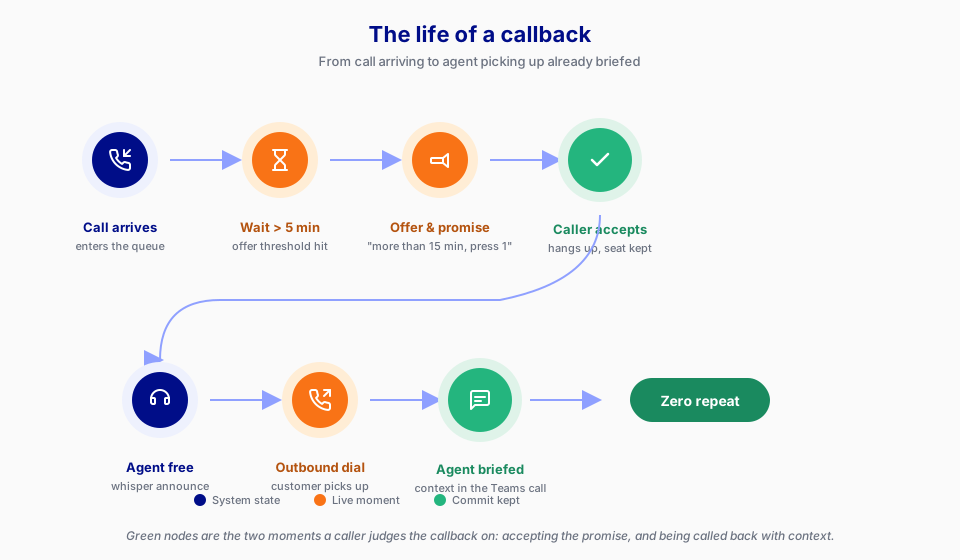
Every setting is per queue on Heedify Contact Center, and every threshold below is admin-defined. The values in brackets are typical, not fixed:
- Offer threshold (e.g. 3 minutes): below this wait time no callback is offered, because proposing one for a two-minute wait irritates more than it helps.
- Deferral threshold (e.g. 30 minutes): above this, we stop announcing a duration and switch to a window (“as soon as we reopen”, “tomorrow morning”).
- Delay before offering: typically 15 seconds after the caller enters the queue.
- Maximum outstanding callbacks (e.g. 200): a hard ceiling on outstanding promises. Above it we stop making new ones. Calls are still answered, still queued, still served.
- Safety margin: the raw wait estimate is multiplied by a factor (e.g. 1.3) before being announced as a promise.
- Promise rounding: rounded to whole minutes, always upward (5-minute step by default).
- Default handling time: a starting value (e.g. 5 minutes) used until the queue history provides a real average.
- Promise-at-risk margin: how close to the promised time the system starts flagging the callback as at risk of missing.
The ceiling matters. A callback system without one is a system that eventually lies at scale.
A busy centre: four agents, five-minute average handling time, caller twentieth in line.
Estimated wait = 20 × 5 / 4 = 25 minutes
Promise = 25 × 1.3 → rounded up to 35 minutes
The caller hears “more than 25 minutes” in the offer and “less than 35 minutes” in the promise. A single fixed announcement of fifteen minutes would be a lie to four callers out of five.
A quiet centre: same staffing, caller third in line, estimated wait 2.25 minutes. Below the offer threshold, so nothing is announced.
The 17:50 call: estimated wait of forty minutes against an 18:00 close. Past the deferral threshold and not absorbable before closing, so the system switches to a window. The caller is called the next morning, ahead of the 09:00 arrivals, because they have been waiting since the previous evening. That has a consequence worth stating out loud: the first thing your morning team does is clear the previous night’s callbacks.
If the customer misses the callback, we retry:
- Three attempts by default, spaced at five minutes, fifteen minutes, then one hour.
- Promises expire after twenty-four hours, even if attempts remain.
- A caller who misses an attempt keeps their seniority but receives a new promise.
- If the agent does not pick up, the callback returns to the queue without consuming an attempt.
When the agent answers there is a gap of ten to twenty seconds while the platform dials the customer. Silence in that gap reads as a dead line and agents hang up. So the agent hears:
- a one-off whisper announcement telling them this is a callback,
- and a looping dialling tone until the customer joins.
Six pre-recorded languages: French, English, Dutch of Belgium, German, Spanish and Italian. Every announcement is a complete pre-recorded phrase rather than fragments assembled on the fly, because assembly is audible.
The central metric is the on-time promise rate: callbacks connected before the promised time, divided by callbacks connected. It is verifiable by construction, because the deadline announced to the caller and the deadline stored in the record are the same value, written once.
One consequence is counter-intuitive. A caller who accepts a callback hangs up, and a naive system classifies that as an abandoned call, so the day you switch the feature on your abandonment rate gets worse while your service gets better. We handle this explicitly: a caller who accepted a callback is not an abandon. The outbound leg is also excluded from call volumes, so one caller does not become two calls.
See a callback that keeps its promise
Fifteen minutes with our team is enough to walk you through a live callback inside Microsoft Teams, on a real call queue.
With Heedify AIR, our AI receptionist for Microsoft Teams, the keypad disappears entirely. Heedify AIR offers the callback in natural language, understands the caller’s answer without a DTMF key, and captures why they were calling. No press 1, no system prompt asking the caller to record their name. The request is written straight into the queue, and the agent who takes the callback already knows what it is about. A returned call where the agent knows the reason is a shorter call and a better one.
What it does not do, plainly, because it makes everything above credible. The caller does not choose the number we call back on: we call the number they called from, which means a caller from a switchboard without a direct line cannot use the feature. The caller does not choose a time slot. This is not an outbound campaign dialler. And it is voice only.
FAQ
Does Microsoft Teams support callback in call queues?
Yes. Native callback has been available since the end of 2024, configurable in the Teams Admin Center or PowerShell, with no licence beyond Teams Phone.
Why does Teams say "we will call you back within X minutes"?
Because X is your call queue timeout value, not a calculation based on the caller's wait. The same number is announced to every caller regardless of how long they have queued.
Can I customise the Teams callback message?
You can customise the offer prompt that tells callers which key to press, using text-to-speech or an audio file. The confirmation flow that follows, including the promise and the name recording, is not customisable today.
Does the caller keep their place in the queue with Teams callback?
The request remains associated with the queue, but the promised time announced to the caller is derived from the queue timeout rather than from their position. Heedify handles seniority explicitly: the caller's arrival time stays with the request until it is served.
Does Teams callback retry if the customer does not answer?
No. The caller is told at the outset that if they miss the callback, they should call the hotline again later. Heedify retries up to three times by default, spaced at 5 / 15 / 60 minutes, and keeps the caller's seniority between attempts.
How do I know if a Teams callback failed?
Set CallbackEmailNotificationTarget to a Microsoft 365 group, which receives an email when a callback times out or cannot be completed. Be aware that a callback which connects to an agent and plays the announcement before being cut short by the queue timeout may be recorded as successful.
Why did my Teams callback disconnect as soon as the agent answered?
Almost certainly the queue timeout. The whole process has to fit inside it, and a short timeout cuts the callback off mid-announcement.